
Download TeamLogger – Time Tracking, Screen Capture, Remote Monitoring
Overview
TeamLogger is a desktop software solution designed for businesses seeking to monitor employee productivity through time tracking and optional screen capture. The software enables employers to gain visibility into how work hours are spent, offering detailed reports, timesheets, and, when enabled, screenshots of employee screens. This functionality is particularly useful for remote teams where accountability and workflow transparency are critical. The tool is intended for managers and business owners who need structured insights into team activities without constant oversight.
By combining time tracking with optional screen monitoring, TeamLogger supports a balance between trust and verification. Employers have full control over whether the screen capture feature is active, allowing for compliance with privacy policies and workplace ethics. The data collected is accessible via a web-based dashboard, enabling real-time review of employee activity across multiple locations. This setup is ideal for freelancers managing remote contractors, small business owners overseeing distributed teams, or project managers tracking task progress.
The developer, TeamLogger, did not provide additional information about its background or development philosophy. However, the software’s focus on remote monitoring and time tracking suggests it was built with distributed workforces in mind. The tool operates as a desktop application that runs in the background, recording time and, if enabled, capturing screen activity at regular intervals.
Key Features & Capabilities
- Time Tracking – Automatically records work hours for each employee, providing accurate timesheets and detailed time logs that can be exported or reviewed in the web dashboard.
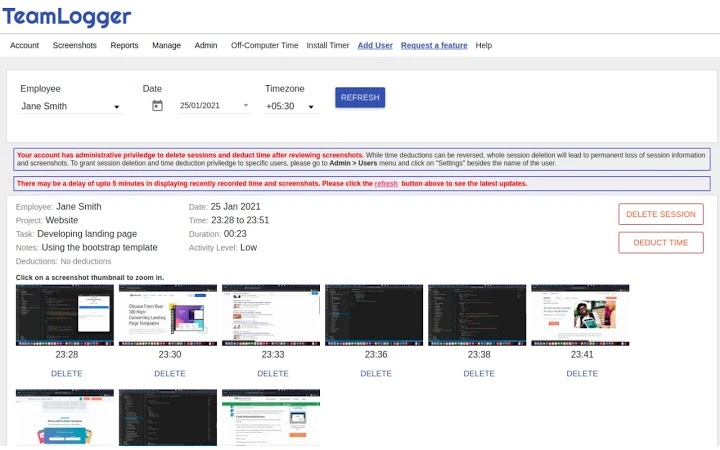
- Optional Screen Capture – Allows employers to capture screenshots of employee screens at set intervals. This feature is fully configurable and can be disabled per user or team.
- Web-Based Dashboard – Centralized access to reports, timesheets, and screenshots (if enabled), enabling managers to monitor team performance from any device with internet access.
- Remote Monitoring – Designed for distributed teams, the software supports remote tracking without requiring physical presence or additional hardware.
- Flexible Reporting – Offers customizable reports that can be filtered by date, employee, project, or task, helping managers analyze productivity trends and identify bottlenecks.
These features are particularly effective in environments where task completion and time allocation need to be verified. For example, a project manager can use the time tracking data to assess how long tasks take and compare actual vs. estimated effort. When screen capture is enabled, it can help verify that employees are working on assigned tasks and not engaging in non-work-related activities during work hours.
User Interface, Workflow & Performance
TeamLogger operates as a desktop application with a minimal interface designed for background operation. The user interface is straightforward, focusing on functionality rather than visual complexity. Users are likely to interact with the software primarily through the web dashboard, where all data is centralized and accessible.
Navigating the application is expected to be intuitive, with clear labeling and organized sections for time logs, reports, and screen captures. The workflow is designed to minimize disruption—once installed, the software runs silently in the background, automatically recording time and capturing screens when enabled.
Performance details were not specified by the developer. However, based on general software behavior, the application is expected to use minimal system resources. The 20 MB installation size suggests a lightweight footprint. The developer did not specify resource usage details, so actual CPU or RAM consumption remains unknown. Stability is assumed to be consistent with standard desktop applications, though no user feedback or crash reports were provided.
Compatibility & System Requirements
TeamLogger is compatible with both Windows and Mac operating systems, making it accessible to a broad range of users across different platforms. The software is available in version 1.0 and has a file size of 20 MB, indicating a compact installation package.
Exact system requirements were not listed. The developer did not provide information about minimum hardware specifications such as processor speed, RAM, or available disk space. Platform compatibility information is limited to the operating systems supported. It is recommended to install the software on systems with standard modern configurations to ensure smooth operation.
Pros and Cons
Pros
- Free to use with no cost barrier to entry
- Supports both Windows and Mac platforms
- Optional screen capture allows for privacy-conscious deployment
- Web-based dashboard enables remote access and real-time monitoring
- Automated time tracking reduces manual data entry
Cons
- No information provided on system requirements or resource usage
- Screen capture feature may raise privacy concerns if not managed transparently
- Dependence on web dashboard means internet access is required for full functionality
- No details on update frequency or long-term support
- Missing information on offline mode or data sync behavior
FAQ Section
Is TeamLogger compatible with both Windows and Mac?
Yes, TeamLogger is designed to run on both Windows and Mac operating systems.
Can I disable the screen capture feature for certain employees?
Yes, the screen capture feature is optional and can be enabled or disabled per user or team by the employer.
Is TeamLogger safe to use on company devices?
TeamLogger is a desktop application that operates with minimal system impact. The developer did not provide specific security details, but it is designed to run in the background without interfering with normal operations.
Do I need an internet connection to use TeamLogger?
While the desktop application runs locally, the web dashboard requires an internet connection for full functionality, including viewing reports and screenshots.
What kind of license does TeamLogger use?
TeamLogger is available for free, with no licensing fees or subscription model currently disclosed.
Final Thoughts + CTA
TeamLogger offers a practical solution for businesses seeking to track employee time and monitor remote work with optional screen capture. Its dual functionality—time tracking paired with privacy-respecting monitoring—makes it a strong choice for managers who value transparency without constant oversight. The free pricing model lowers the barrier to adoption, and the cross-platform support ensures accessibility across diverse teams.
While some technical details remain unspecified, the software’s core features are well-aligned with the needs of remote teams and small to medium-sized businesses. The web-based dashboard enhances usability, allowing real-time access to critical data. However, users should be mindful of privacy considerations and ensure clear communication with employees about monitoring policies.
For employers looking to improve accountability and productivity in a distributed workforce, TeamLogger presents a compelling, no-cost option. Download TeamLogger now to start tracking time and monitoring work activity with confidence.







